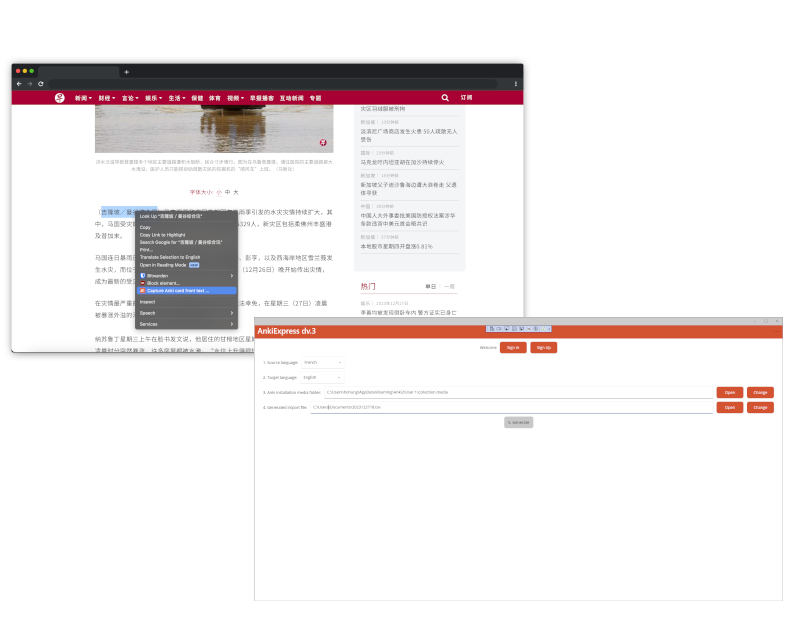
What is AnkiExpress?
AnkiExpress is a Chrome extension that lets you capture words and phrases while you read, automatically generates the translation and native-speaker audio, and exports a file you can import into Anki in one click.
Which languages does AnkiExpress support?
AnkiExpress supports translation and audio generation for 40+ languages, including English, French, Mandarin Chinese, Spanish, Japanese, German, Italian, Korean, Russian, Arabic and Hindi. Latin transliteration is available for languages such as Arabic, Chinese, Greek, Hebrew, Hindi, Japanese, Korean, Russian, Tamil, Thai and Ukrainian. See the full list of supported languages.
Which web browsers does AnkiExpress work with?
AnkiExpress is built for Google Chrome and installs from the Chrome Web Store. It also runs on most Chromium-based browsers that can install Chrome extensions, such as Microsoft Edge and Brave. The optional companion app used to generate audio runs on Windows.
Which websites can I capture words from?
You can capture from almost any web page where you can select text, including news sites, blogs, online books, Wikipedia and forums. See how to make Anki cards from web articles for a full walkthrough.
Do I need an account or the Windows companion app?
You need a free AnkiExpress account to use the Chrome extension. The Windows companion app is optional and helps streamline importing cards into the Anki desktop app, and it is what generates native-speaker audio.
How do I add native-speaker audio to my cards?
Native-speaker audio is generated by the optional Windows companion app, which creates an audio clip for each card and places it in your Anki media folder. The Chrome extension lets you preview pronunciation while you capture. See how to add native-speaker audio to Anki cards automatically.
Does AnkiExpress work offline?
You need an internet connection to capture words and generate translations and audio, because they are produced on our servers. Once the cards are imported into Anki, reviewing them works completely offline.
What do the generated Anki cards look like?
AnkiExpress exports a tab-separated file. The text you captured becomes the front of the card and its translation the back, with native-speaker audio attached when you use the companion app. During import you choose which deck the cards go into.
Can I sync the cards to AnkiWeb and study on mobile?
AnkiExpress imports your cards into the Anki desktop app. From there, Anki's own Sync pushes them to AnkiWeb and your other devices, so you can review on AnkiDroid (Android) or AnkiMobile (iPhone and iPad). AnkiExpress itself does not connect to AnkiWeb directly.
What happens to the text I capture?
Your captured words are stored on your AnkiExpress account only until you download your import file. They are deleted after a successful download, and generating the file does not use any tokens.
How does pricing work?
There is no subscription — you buy tokens and pay only for what you use, where 1 token generates 1 card. The Starter package is US$5 for 500 cards and the Enthusiast package is US$50 for 6,000 cards. New users get 10 free tokens, and tokens never expire.
Is AnkiExpress affiliated with Anki?
No. AnkiExpress is an independent tool and is not affiliated with Anki, AnkiWeb, or any of its subsidiaries.